Online multiplayer is for the music quiz nights where you can't all be in the same room. Long-distance friends, mixed work-from-home schedules, the international group chat that finally found a date that works. You all open Guezzer, somebody hosts, the rest join the room, and the buzzer race kicks off - just like local multiplayer, but everyone's in their own kitchen.
This post covers what online multiplayer changes, what stays the same, and how to get a round running. If you haven't read the How to play Guezzer post yet, start there - this one builds on it.
When local multiplayer is the better pick
If you're all in the same room, play local multiplayer instead. Sharing a speaker and reading each other's reaction times in person is what the game was built for. Online exists for everything else.
What changes online
- Each player hears the music through their own phone. No shared speaker. Guezzer keeps every device in sync so the song starts at the same moment for everyone.
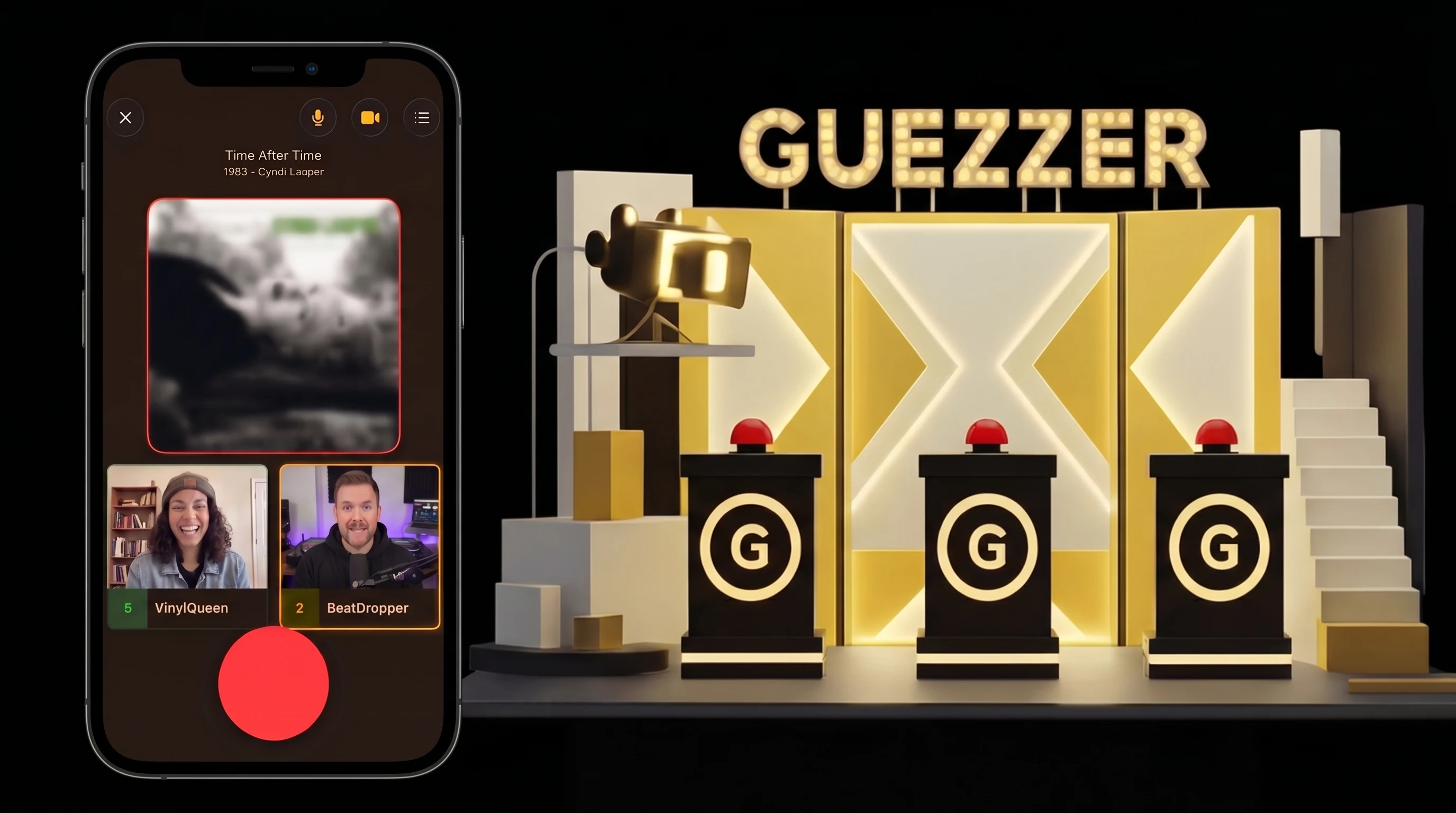
- Built-in audio and video chat. You see and hear each other while you play. The game-night atmosphere doesn't depend on a separate Discord or Zoom call.
- Room codes for joining. The host creates a room, gets a short code, and shares it. Players either tap a deep link from a chat or enter the code manually inside the app.
- Internet matters more. Local play needs internet too, but online play is more sensitive to packet loss. Stable WiFi beats spotty cellular every time.
What stays the same
The core game doesn't change. Same buzzer race, same shouted answers, same one-shot-per-song rule. The host still configures the same three things in the lobby:
- Points to win (5, 7, or 9 correct guesses)
- Difficulty (title only, title + artist, or title + artist + features)
- Evaluation (self-confirmation by default, AI as the optional fallback)
If you've played a local round, you already know how an online round works. For the full rule breakdown, head back to How to play Guezzer.
Starting an online round
The host creates a room from the app's home screen. A short room code appears, plus a share button.
There are two ways friends join:
- Deep link. Share the link from the room - tapping it on a friend's phone opens Guezzer and drops them straight into the lobby. Works in any chat app: WhatsApp, iMessage, Discord, anything.
- Manual code. Friends open Guezzer, go to the Multiplayer tab, flip the online toggle on, and tap the join-game icon (the icon button to the left of "Play game"). Enter the code there. Useful when the link can't make it - corporate chat filters, screenshot-only group chats, that one friend who pastes everything wrong.
Once everyone is in the lobby, the host configures the round and starts. Cross-platform is fine - iPhone and Android players play together in the same room. Cross-region is fine too. Hosting from Berlin with friends in Brazil works; latency might creep in for the most extreme distances, but the music stays in sync.
Audio and video chat
This is the bit that makes online multiplayer actually fun.
Guezzer has built-in audio and video chat - no second app, no Zoom link to remember. By default the mic is always on, so the chatter, laughter, and trash talk that makes a game night a game night happens naturally. Mute yourself any time, switch the camera off if you want, both are toggled per player.
A few things worth knowing:
- You can join with voice off. If your background is loud or you'd rather just listen, mute up. The game still works perfectly.
- Your voice transmits during guessing. When you buzz and start answering, your mic opens automatically so the room hears your answer - no need to wrestle with the mute button at the buzzer moment.
- Video is optional. Some players love seeing reactions in real time, others would rather not be on camera at home. Both are fine - the game doesn't care.
The round itself
Once the round starts, it plays exactly like local multiplayer:
- Music starts on everyone's phone, perfectly synced.
- First player to slap the buzzer gets to answer.
- They shout the answer out loud (the mic transmits automatically - see above).
- Self-confirmation or AI evaluates it, depending on the host's setup.
- One shot per song. Wrong answer = locked out for the rest of the track.
- First player to hit the points-to-win target wins the round and earns a record.
Records stack up in your profile and feed the same Vinyl → Gold → Platinum → Diamond ladder as local multiplayer. There is no separate "online records" pile - a win is a win.
Tips for a great online game night
A few specifics that don't matter offline but matter a lot online:
- Headphones, not speakers. Earbuds or over-ears keep the music out of your mic. Without them your phone's speaker bleeds into your mic and confuses voice chat.
- WiFi over cellular. A stable WiFi connection avoids the dropped-music-mid-song moments. If you must use mobile data, sit somewhere with full signal.
- 4-6 players is the sweet spot. Online supports the same 2-10 cap as local, but voice and video chat get crowded past six. Pick your night accordingly.
- Schedule it. "Let's play sometime" never happens. "8pm Thursday, drinks optional" does.
- Have a fallback call ready. If the in-game voice chat hiccups (bad WiFi at one player's place, congested home network), drop it and run a parallel Discord or FaceTime call. The game itself keeps running.
That's online multiplayer. Same buzzer race, same record reward, just spread across living rooms. Grab the app, create a room, paste the code into your group chat, and find out who actually listens to the radio - even from 800 kilometers away.